Clubquay
Your whole club.
One simple app.
Know who's playing, collect subs, sell match tickets and look after every player — all from your phone. No spreadsheets. No endless group chats.
Sound familiar?
Running a club shouldn't feel like a second job.
If you help run a grassroots club, you'll know these. Now flip the switch.
Two hundred messages in the group chat just to find out who’s playing.
Chasing subs in the car park, again.
Injury forms in a drawer, if they get filled in at all.
Copying fixtures by hand into five different places.
The same three people doing every job.
A spreadsheet of members nobody trusts.
Running a club is a labour of love. Clubquay takes the admin off your hands — so volunteers spend Saturday on the touchline, not on their phones.
Everyone in the huddle
One club. Everyone connected.
Coaches, parents, players and volunteers each get what they need, in the same app. Tap a role to see what's in it for them.
How it works
A week at your club, with Clubquay.
Follow a normal week and see where the hours come back. Tap a day to jump straight to it.
1 · Monday to Thursday
Who's playing Saturday? Sorted by Thursday.
Ask the whole team in one go. Parents tap Free, Maybe or Can't — and can add a quick note. You watch the answers add up, then pick your side in seconds.
Have a go — tap an answer for any player.
2 · Tuesday training
Keeping children safe, made simple.
If a player gets hurt, Clubquay walks you through what to do — and makes sure nobody forgets, even weeks later.
- Step 1
Write down what happened
The coach fills in a short form on their phone, right there by the pitch.
- Step 2
They rest until they're ready
After a head knock, the player can't be picked until a doctor says yes. Their family is told straight away.
- Step 3
Back to playing, bit by bit
A simple checklist shows the club and the family what's allowed at each stage.
- Step 4
Nothing gets lost
Every report is kept safely and can't be quietly changed. Need a copy? Download it in one tap.
Who's here tonight?
Tap a name to mark them here. Try Callum.
Reports you can trust
“Bumped heads in a tackle drill. Sat out the rest of the session.”
Anyone can raise a worry
A parent or visitor spots something wrong? They can tell the club without signing up — and without giving their name.
Quick checks before training
A few yes-or-no questions about the pitch and kit, ticked off in under a minute.
What to do in an emergency
Where the defibrillator is and how an ambulance gets in — for every ground you play at.
Medical info, kept private
Allergies, medical notes and parent permissions — only the right people can see them.
3 · Thursday · The coach's plan
Draw it once. Everyone gets it.
Sketch a move on the pitch, press play, and the whole squad sees exactly where to run. Share it before Saturday — no whiteboard needed.
Wide attack: the ball goes quickly through the hands to our fastest runner on the outside, who has space to score.
Plan for the opposition
Make a page for Saturday's opponents: what they're good at and how you'll play them.
Players see it on their phone
No printing, no lost sheets. The moves are there whenever they want a reminder.
Print it if you like
Download your whole playbook to print for the changing room.
4 · Saturday · Matchday
Big game? Sell tickets in minutes.
Fans buy tickets on their phone. On the day, any volunteer can check them at the gate — and you can see how much you've taken before the final whistle.
Press “Check ticket” to see what the gate volunteer sees.
5 · Every month · The money
Subs paid. No awkward conversations.
Set your prices once. Parents pay on their phone, the money goes to the club's bank account, and you can see who's paid at a glance.
Your membership prices
- JuniorTraining, matches and a kit discount£32 a month
- SeniorTraining, matches and a bar discount£44 a month
- SocialFirst dibs on club events£60 a season
Example prices. Every member also gets a membership card on their phone.
When should we remind people who haven't paid?
Once a payment is 14 days late, Clubquay will suggest a friendly reminder.
Your own club shop
Sell kit, scrum caps, socks or raffle tickets. Parents order and pay in the app, and you get a handy list of what to hand out on kit night.
See it for real
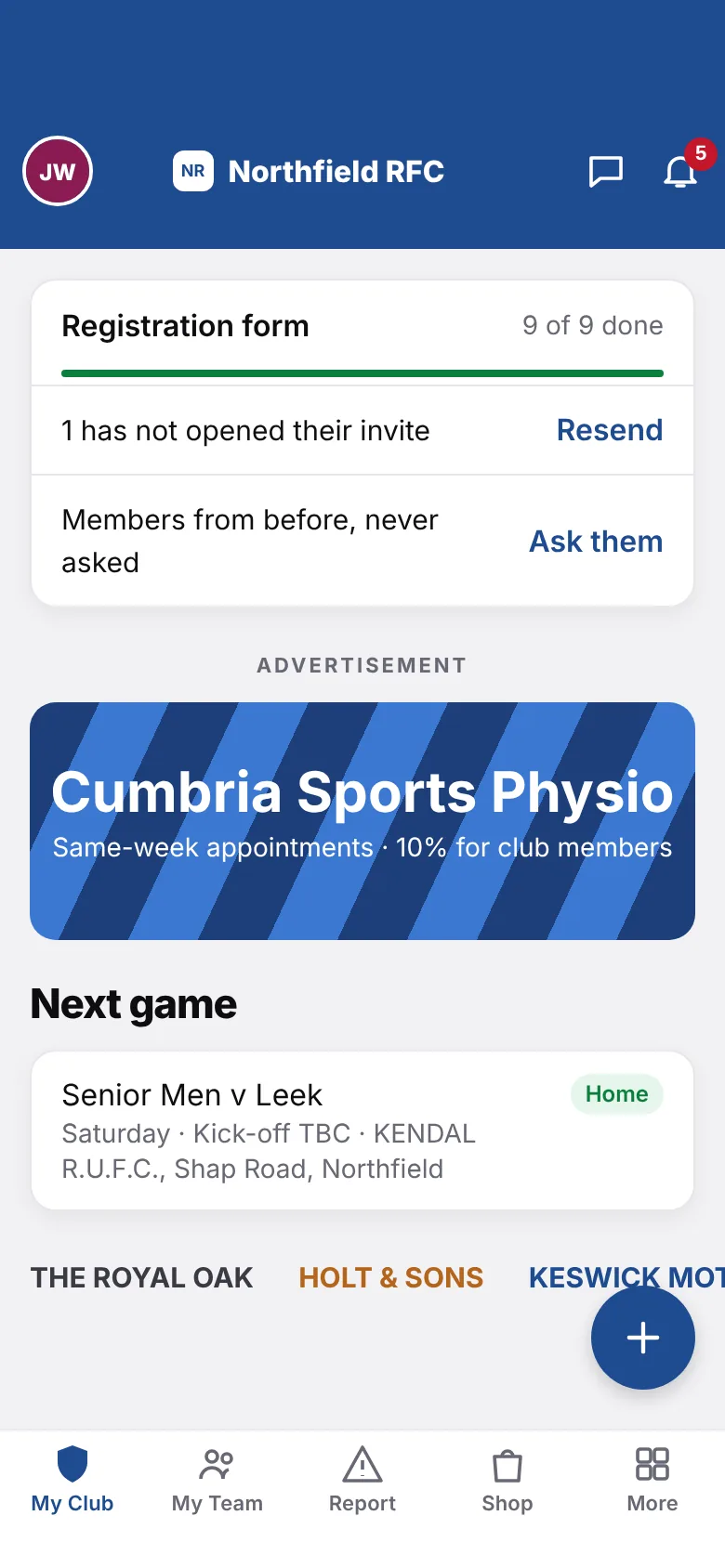
This is the actual app.
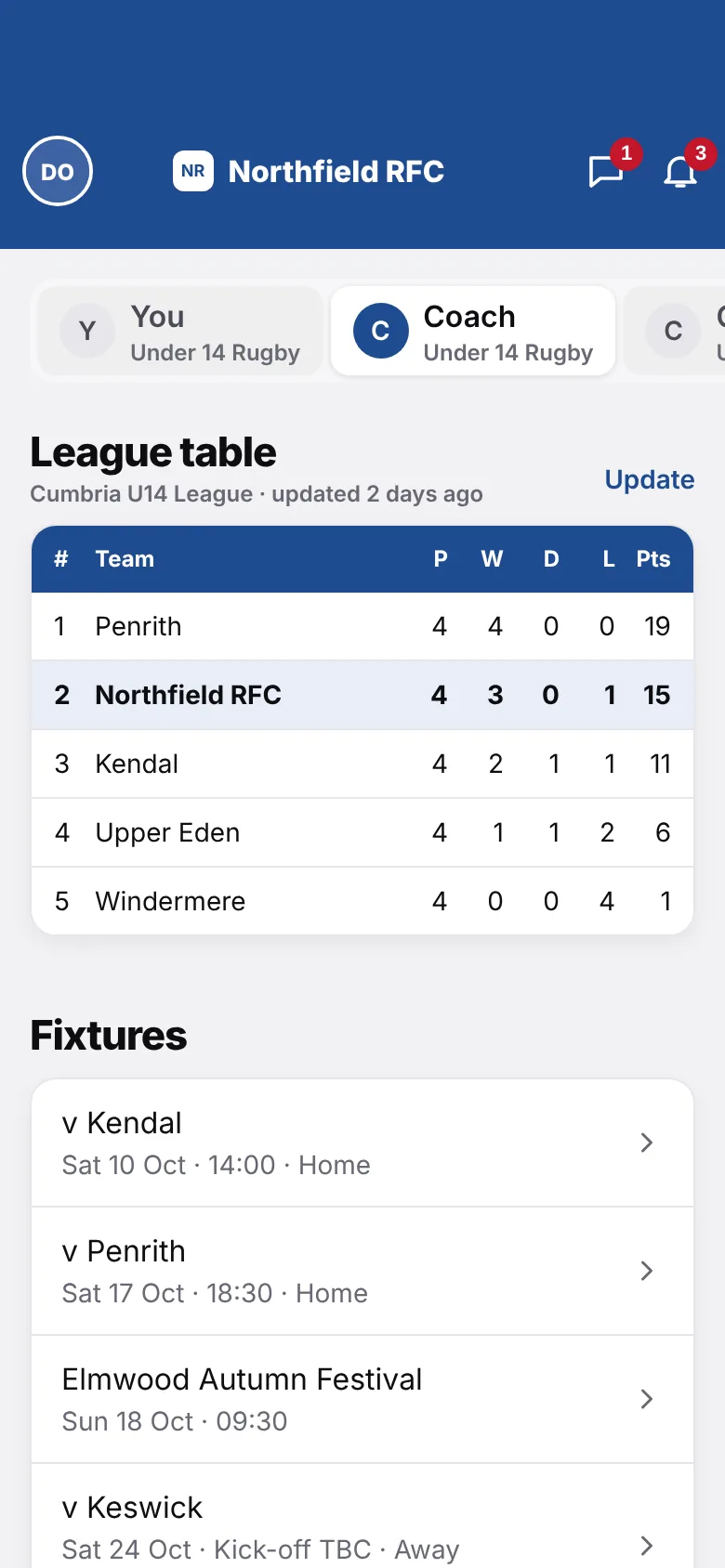
No mock-ups. These are real Clubquay screens. Pick a topic.
Run your team from your pocket
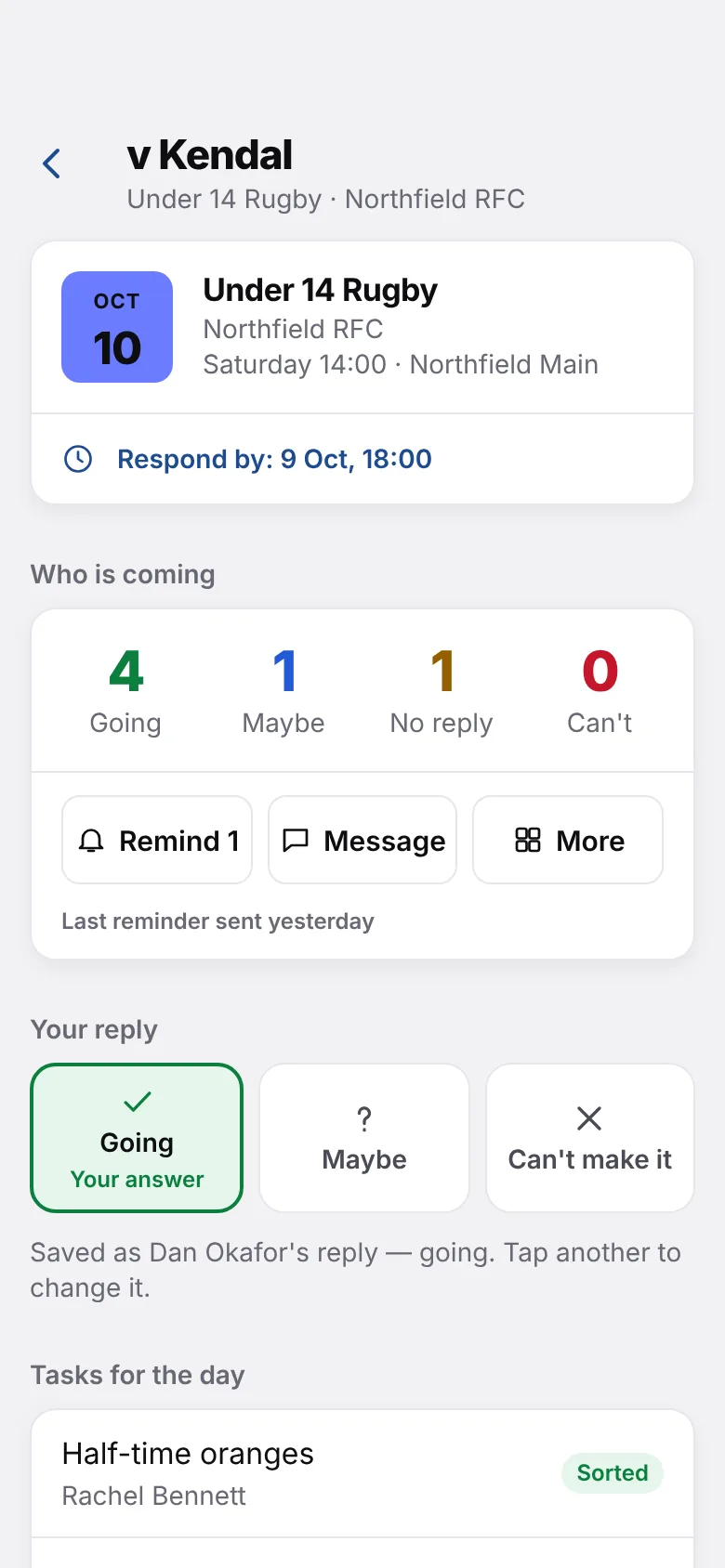
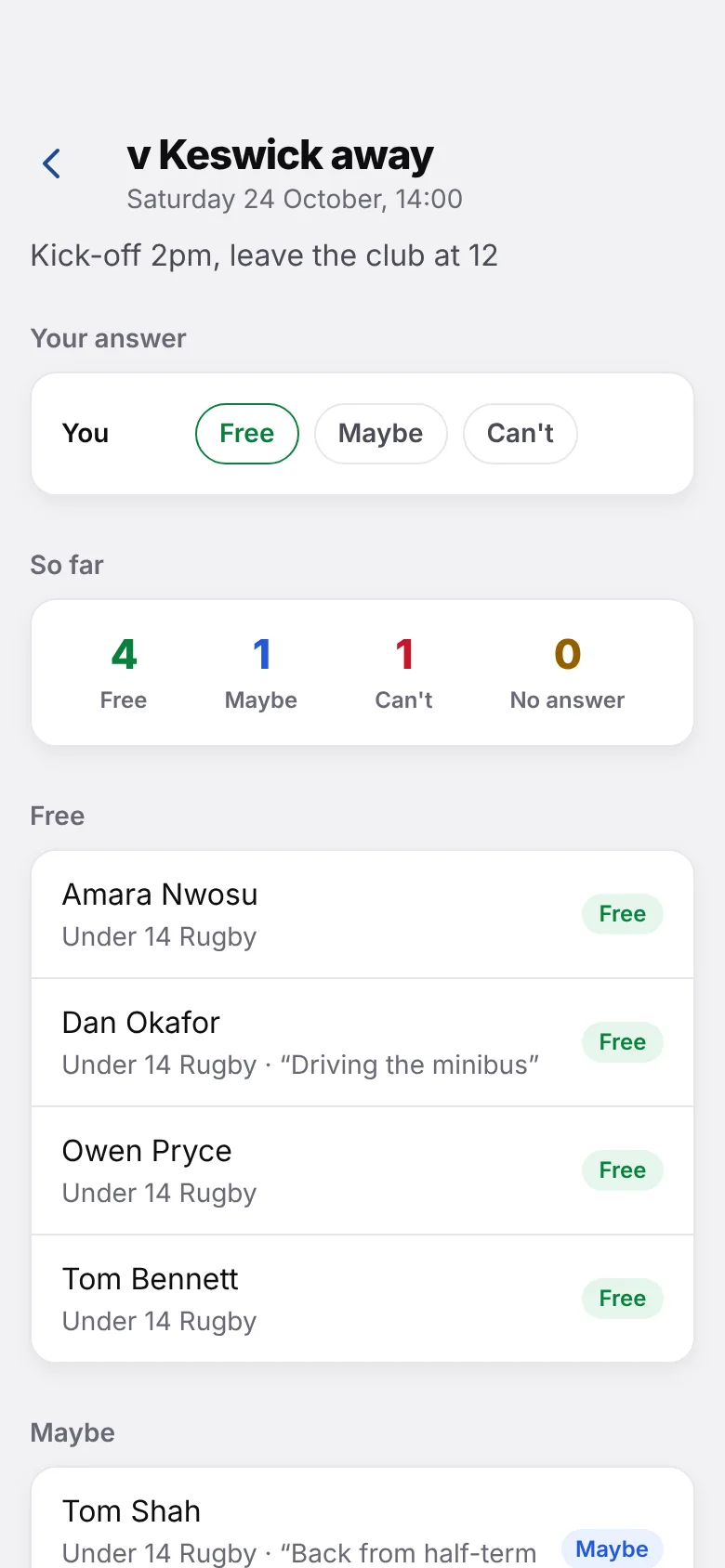
Every game, every training session and every answer from parents, all in one place.
- See who's free for every game, with their reasons
- Meet time, kit list and what to bring for each match
- Jobs for the day: oranges, lifts, running the line
Your club's look
It wears your colours.
Add your badge, pick your club colour and choose a style of lettering. Members see your club — not ours.
Everything in Clubquay
Every feature, in plain English.
Search for anything your club needs, or pick a topic.
All 69 features
Who’s free?
Ask the team and see Free, Maybe or Can’t add up.
Pick the team
Choose your side from who’s free, 1 to 15 and the bench.
Two squads
Split players into two squads for festivals or busy weekends.
Training register
Mark here, late, away or excused in one tap.
Fixtures and results
Every game for every age group in one list.
Fixtures added for you
Pull fixtures in from your league, then just approve them.
Upload a spreadsheet
Got fixtures in a spreadsheet? Upload it and you’re done.
Phone calendar links
Games appear in everyone’s own calendar automatically.
League tables
See where every team sits, and update it after each game.
Match and training events
Meet time, place, kit list and what to bring.
Jobs for the day
Oranges, lifts, running the line: first to tap has it.
Chat on each game
Parents can sort lifts and late arrivals under the event.
Reminders
Nudge anyone who hasn’t answered with one tap.
Accident reports
A short form the coach fills in by the pitch.
Head injury stand-down
The player can’t be picked until a doctor says they’re OK.
Return to play
Step-by-step stages, shared with the family.
Health questions
A quick health questionnaire before someone starts playing.
Before-training checks
Pitch, posts, first-aid kit: ticked off in a minute.
Emergency plans
Where the defibrillator is and how the ambulance gets in, per ground.
Medical details
Allergies and medical notes, seen only by the right people.
Parent permissions
Photo, medical and travel consents, kept on file.
Raise a worry
Anyone can tell the club about a problem, no account or name needed.
Locked records
Reports can’t be quietly changed or deleted, only added to.
Download as PDF
Send a full report to the county, the insurer or a parent.
Safety guides
Simple guides and resources for coaches and welfare officers.
Safety archive
Older reports kept safely for as long as you need them.
Membership prices
Set monthly or season prices for juniors, seniors and socials.
Ask for a payment
Match fees, tours, summer camp: request it from the right people.
Who has paid
See what’s in and what’s still to come at a glance.
Pay in one tap
Parents pay what they owe straight from the app.
Friendly reminders
Remind people who are late. You always decide when.
Paid to the club’s bank
Money goes straight into the club’s own account.
Membership card
A card on every member’s phone that works without signal.
Club shop
Sell kit, caps, socks and raffle tickets with sizes.
Kit supplier
Connect your kit supplier so parents can order in the app.
Baskets held
Items are kept for parents while they pay.
My orders
Parents can see what they’ve bought and when to collect.
Kit-night hand-out list
A simple list of what to give to whom.
Match tickets
Adult, concession and child tickets for big home games.
Check at the gate
Any volunteer can check tickets on their phone.
Takings
See tickets sold and money taken as it happens.
Messages
Message a team, the coaches or a single parent.
Club news
Match reports and announcements with photos.
Posts
Quick updates, like the clubhouse opening after the match.
Polls
Let everyone vote on dates and decisions.
Photos and videos
Match albums the whole club can enjoy.
Notifications
Choose exactly what you’re told about.
Works with bad signal
Messages wait and send when signal comes back.
Join with a club code
Share one code and families join in seconds.
Invite links
Send a link to invite new players and parents.
Registration form
Families fill in their own details and permissions.
Import members
Bring your existing list over from a spreadsheet.
Requests to join
Say yes or no to new people before they get in.
Member profiles
Everything about a member in one place.
Roles and permissions
Coaches, treasurer and welfare officer each see what they need.
Volunteer certificates
Track coaching badges, with a nudge before they run out.
Governing body register
Keep player registrations with your sport’s governing body up to date.
Playbook
Draw moves on a pitch and share them with the squad.
Opposition plans
Plan how to play each team you face.
Print your playbook
Download the whole playbook to print.
Attendance reports
Spot players who’ve stopped coming before they drift away.
Badge and colours
Your badge, your colour and your choice of lettering.
Teams and age groups
Set up every team, from minis to seniors.
Grounds and pitches
List your grounds so everyone knows where to go.
Sponsors and adverts
Give local businesses a spot on the home screen.
Your own safety questions
Add your own checks and report questions.
Your own consent wording
Use the words your club already uses.
More than one club
Belong to several clubs and switch between them.
Privacy controls
See and manage the information the club holds about you.
For the committee
Questions committees ask.
How long does it take to set up?
Create your club, add your badge and colours, then share your club code. Families fill in their own details and permissions, so you don't have to type everyone in.
Will parents and volunteers actually use it?
It's built for busy people. Saying “I'm free”, paying subs or marking the register takes a single tap, and everything is written in plain English.
Who can see medical and safety information?
Only the people whose role needs it, such as your welfare officer. You decide who has which role, and members can see what the club holds about them.
Can we bring our members and fixtures with us?
Yes. Upload members and fixtures from a spreadsheet, or bring fixtures in from your league. Nothing has to be retyped.
Does the money go straight to the club?
Yes. Subs, match fees and shop orders are paid into the club's own bank account, and the treasurer can see who has paid at a glance.
What happens if someone gets hurt?
The coach fills in a short report by the pitch. After a head knock, the player can't be picked until a doctor says they're OK, and the family is told straight away. The report is locked, so it can be trusted later.
What does it cost?
[ADD PRICING] Or talk to us and we'll walk you through what's right for your club.
Is it only for rugby clubs?
[CONFIRM WHICH SPORTS ARE SUPPORTED]
Moving over is easy.
Already using another app or a spreadsheet? You won't have to type everyone in again.
- 1
Bring your list
Upload the spreadsheet of members you already have.
- 2
Share your club code
Send it to the team chat. Families download the app and join.
- 3
Families check their details
They confirm their own info and permissions. You don't retype a thing.
Bring your club to Clubquay.
Set it up tonight. Your first team can be on it by the weekend.